
Showing posts with label PHP Tutorial. Show all posts
Showing posts with label PHP Tutorial. Show all posts
Introduction To PHP Programming For Beginners

Choosing PHP Editor For Web Programming

Apache Document Root In XAMPP

XAMPP Installation Step On Windows 7

Use date and time Functions in PHP

Protect Uploaded Files by .htaccess and Download using PHP Header
Using the internet to share the data, chat with friends or colleagues via social media is a common activity at this time. And people are not ignorant to upload or download a file through the Internet to share with many people who are connected. On this occasion I will share about how to protect a file that is uploaded using .htaccess so that users can not download directly.
Validate Input FIle From HTML Form Using PHP

In developing a web-based application developers often have to provide a facility to upload files on their application. Several factors were behind the developer to provide a facility to upload files, for example, upload a picture (jpg, png), document (doc, pdf), archive (zip, rar) and others. But granting users to upload files, open the gap to the attackers in which the attacker can upload malicious files to the server.
Send Email Using PHP Script
In building a web application, sometimes we need a function to send email. For example, to verify the registration, send the latest product information to customers, send information lost passwords, or send articles for the readers. When we use PHP, we could use the function mail() to send email to the user.
Syntax :
Syntax :
mail ( string to, string subject, string message [, string additional_headers
[, string additional_parameters]]);Create Web Thumbnail and Screenshot using PHP
In this post will discuss how to create a web screenshots or web thumbnail using a simple php. Web-screenshot or Web thumbnail is an image of a web presence that is the result of capture. So how do we capture a web page using PHP? We can use the class Web Thumbnail from www.phpclasses.org. This class was created by Lukasz Cepowski, thank him for the class, we can capture a screenshot of a page. This service supports the Firefox, Google Chrome or Opera browsers.
Web Pagination Using PHP and MySQL
What is web pagination? Previously, we'll know a little about web pagination. Web pagination is a method of presenting data on web pages by dividing it into several pages and make the numbering on the pages where data is displayed quite a lot. Web pagination is often found on the homepage or on the page that displays the search results. The easiest example is found on a Google search results page.
Creating Content Excerpt Using PHP
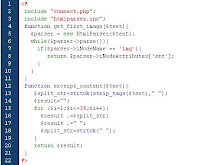
We will use MySQL to store the data content and PHP as a scripting language that will handle the process and sends a response to the client. The first we have to create a database first. I'm not going to explain how to create a database in MySQL, but you can get a database dump file export results that have been made. Download my_db.sql.
Manage and Enable Image Upload in TinyMCE with PHP
Subscribe to:
Posts (Atom)

 Posts


